Thursday, November 19, 2015

LINQ - ASP.Net

As a set of .NET framework extensions, LINQ is the preferred mechanism for data access by ASP.NET developers. ASP.NET 3.5 has a built-in tool LINQDataSource control that enables usage of LINQ easily in ASP.NET. ASP.NET uses the above mentioned control as a data source. Real life projects mostly encompass websites or windows applications and so to understand better the concept of LINQ with ASP.NET, let’s start with creating a ASP.NET website that make use of the LINQ features.
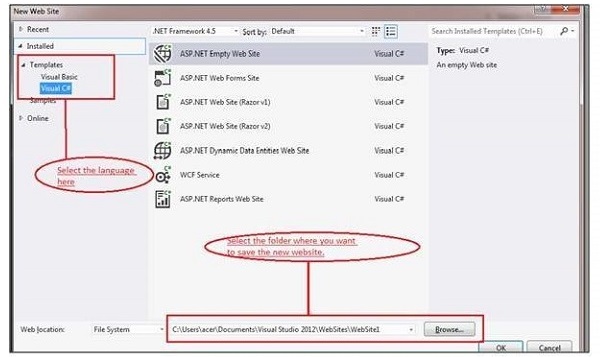
For this, it is essential to get installed Visual Studio and .NET framework on your system. Once you have opened Visual Studio, go to File -> New -> Website. A pop up window will open as shown in below figure.
LINQ - ASP.Net
Now under the templates in the left hand side, there will be two language options to create the website. Choose Visual C# and select ASP.NET Empty Web Site.
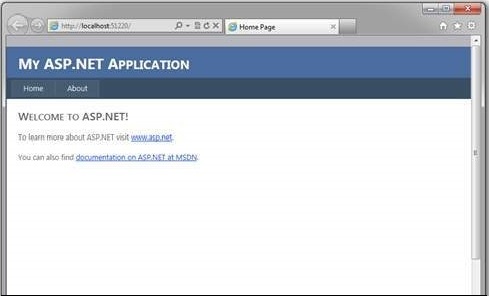
Select the folder where you want to save new website on your system. Then press OK and soon Solution Explorer appears on your screen containing all the web files. Right click on Default.aspx in the Solution Explorer and choose View in Browser to view the default ASP.NET website in the browser. Soon your new ASP.NET website will get opened in the web browser like below figure.
LINQ - ASP.Net
.aspx is in fact the major file extension used in ASP.NET websites. Visual Studio by default creates all the necessary pages for a basic website like Home pageand About Us page where you can place your content conveniently. The code for the website is generated automatically here and can be viewed too.

LINQDataSource Control

It is possible to UPDATE, INSERT and DELETE data in the pages of ASP.NET website with the help of LINQDataSource control. There is absolutely no need for specification of SQL commands as LINQDataSource control employs dynamically created commands for such operations.
The control enables a user to make use of LINQ in an ASP.NET web page conveniently by property setting in the markup text. LINQDataSource is very similar to that of controls like SqlDataSource as well as ObjectDataSourceas it can be used in binding other ASP.NET controls present on a page to a data source. So, we must have a database to explain the various functions invoked by the LINQDataSource Control.
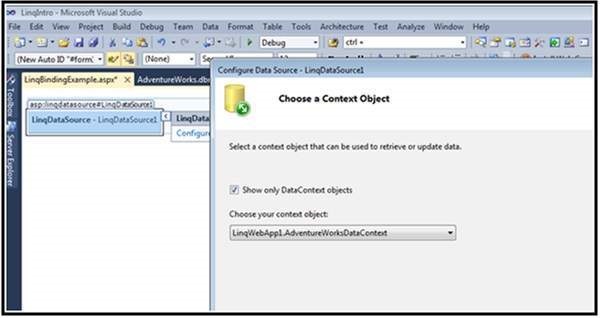
Before going to start explanation of the control usage in ASP.NET web page form, it is essential to open the Microsoft Visual Studio Toolbox and drag and drop LINQDataSource control to .aspx page of ASP.NET website like below figure.
LINQ - ASP.Net
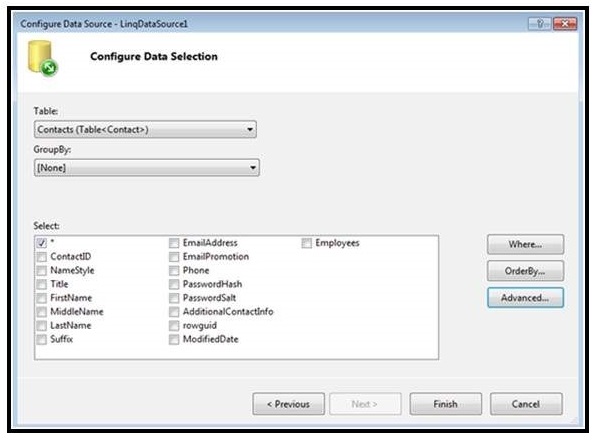
Next step is to configure LINQDataSource like below by selecting all columns for the employee record.
LINQ - ASP.Net
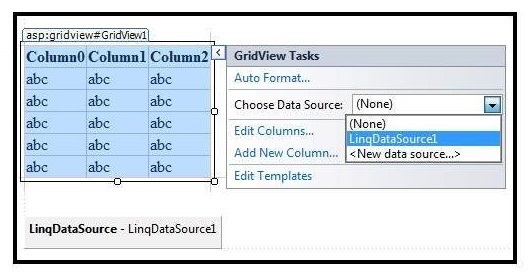
Now add a GridView Control to the .aspx page and configure it like shown in below figure. The GridView control is powerful and offers flexibility to work with the data. Soon after configuring the control, it will appear in the browser.
LINQ - ASP.Net
The coding that can be viewed now on your screen for the .aspx page will be:
<!DOCTYPE html>
<html>
<head runat="server">
  <title></title>
</head>
<body>
  <form id="form1" runat="server">
  <div>
     <asp:GridView ID="GridView1" runat="server" AutoGenerateColumns="False"
          DataKeyNames="ContactID" DataSourceID="LINQDataSource1">
        <Columns>
           <asp:BoundField DataField="ContactID" HeaderText="ContactID"
                InsertVisible="False" ReadOnly="True" SortExpression="ContactID" />
           <asp:CheckBoxField DataField="NameStyle" HeaderText="NameStyle"
                SortExpression="NameStyle" />
           <asp:BoundField DataField="Title" HeaderText="Title" SortExpression="Title" />
           <asp:BoundField DataField="FirstName" HeaderText="FirstName"
                SortExpression="FirstName" />
           <asp:BoundField DataField="MiddleName" HeaderText="MiddleName"
                SortExpression="MiddleName" />
           <asp:BoundField DataField="LastName" HeaderText="LastName"
                SortExpression="LastName" />
           <asp:BoundField DataField="Suffix" HeaderText="Suffix"
                SortExpression="Suffix" />
           <asp:BoundField DataField="EmailAddress" HeaderText="EmailAddress"
                SortExpression="EmailAddress" />
        </Columns>
     </asp:GridView>
     <br />
  </div>
  <asp:LINQDataSource ID="LINQDataSource1" runat="server"
       ContextTypeName="LINQWebApp1.AdventureWorksDataContext" EntityTypeName=""
       TableName="Contacts">
  </asp:LINQDataSource>
  </form>
</body>
</html>
Here it should be noted that it is vital to set the property ContextTypeName to that of the class representing the database. For example, here it is given as LINQWebApp1.AdventureWorksDataContext as this action will make the needed connection between LINQDataSource and the database.

How to INSERT, UPDATE and DELETE data in ASP.NET page using LINQ?

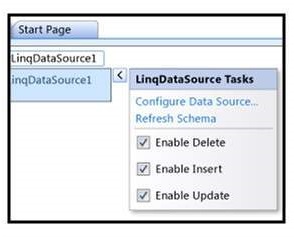
After completing all the above steps rigorously, choose the LINQDataSource Tasks from the LINQDataSource Control and choose all the three boxes for enable insert, enable update and enable delete from the same just like shown below:
LINQ - ASP.Net
Soon the declarative mark up will get displayed on your screen as the following one.
<asp:LINQDataSource 
  ContextTypeName="LINQWebApp1.AdventureWorksDataContext" 
  TableName="Contacts" 
  EnableUpdate="true" 
  EnableInsert="true" 
  EnableDelete="true" 
  ID="LINQDataSource1" 
  runat="server">
</asp:LINQDataSource>
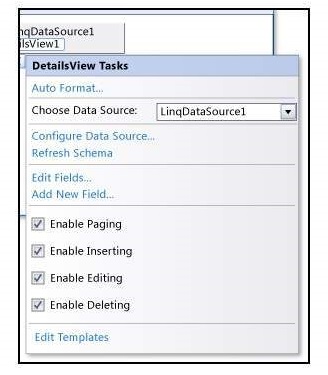
Now since there are multiple rows and columns, it is better to add another control on your .aspx form named as Detail View or Master control below the Grid View control to display only the details of a selected row of the grid. Choose the Detail View Tasks from the Detail View control and select the check boxes as shown below.
LINQ - ASP.Net
Now just save the changes and press Ctrl + F5 to view the page in your browser where it is now possible to delete, update, insert any record on the detail view control.

LINQ - Lambda Expressions

The term ‘Lambda expression’ has derived its name from ‘lambda’ calculus which in turn is a mathematical notation applied for defining functions. Lambda expressions as a LINQ equation’s executable part translate logic in a way at run time so it can pass on to the data source conveniently. However, lambda expressions are not just limited to find application in LINQ only.
These expressions are expressed by the following syntax:
(input parameters) => expression or statement block
Below is an example of lambda expression
y => y * y
The above expression specifies a parameter named y and that value of y is squared. However, it is not possible to execute a lambda expression in this form. Example of a lambda expression in C# is shown below.

C#

using System;
using System.Collections.Generic;
using System.Linq;
using System.Text;

namespace lambdaexample
{
  class Program
  {
     delegate int del(int i);
     static void Main(string[] args)
     {
        del myDelegate = y => y * y;
        int j = myDelegate(5);
        Console.WriteLine(j);
        Console.ReadLine();
     }
  }
}

VB

Module Module1
  Private Delegate Function del(ByVal i As Integer) As Integer
  Sub Main(ByVal args As String())
     Dim myDelegate As del = Function(y) y * y
     Dim j As Integer = myDelegate(5)
     Console.WriteLine(j)
     Console.ReadLine()
  End Sub
End Module
When the above code of C# or VB is compiled and executed, it produces the following result:
25

Expression Lambda

As the expression in the syntax of lambda expression shown above is on the right hand side, these are also known as expression lambda.

Async Lambdas

The lambda expression created by incorporating asynchronous processing by the use of async keyword is known as async lambdas. Below is an example of async lambda.
Func<Task<string>> getWordAsync = async() => “hello”;

Lambda in Standard Query Operators

A lambda expression within a query operator is evaluated by the same upon demand and continually works on each of the elements in the input sequence and not the whole sequence. Developers are allowed by Lambda expression to feed their own logic into the standard query operators. In the below example, the developer has used the ‘Where’ operator to reclaim the odd values from given list by making use of a lambda expression.

C#

//Get the average of the odd Fibonacci numbers in the series... 
using System;
using System.Collections.Generic;
using System.Linq;
using System.Text;

namespace lambdaexample
{
  class Program
  {     
     static void Main(string[] args)
     {
        int[] fibNum = { 1, 1, 2, 3, 5, 8, 13, 21, 34 };
        double averageValue = fibNum.Where(num => num % 2 == 1).Average();
        Console.WriteLine(averageValue);
        Console.ReadLine();
     }
  }
}

VB

Module Module1
  Sub Main()
     Dim fibNum As Integer() = {1, 1, 2, 3, 5, 8, 13, 21, 34}
     Dim averageValue As Double = fibNum.Where(Function(num) num Mod 2 = 1).Average()
     Console.WriteLine(averageValue)
     Console.ReadLine()
  End Sub
End Module
When the above code is compiled and executed, it produces the following result:
7.33333333333333

Type Inference in Lambda

In C#, type inference is used conveniently in a variety of situations and that too without specifying the types explicitly. However in case of a lambda expression, type inference will work only when each type has been specified as the compiler must be satisfied. Let’s consider the following example.
delegate int Transformer (int i);
Here the compiler employ the type inference to draw upon the fact that x is an integer and this is done by examining the parameter type of the Transformer.

Variable Scope in Lambda Expression

There are some rules while using variable scope in a lambda expression like variables that are initiated within a lambda expression are not meant to be visible in an outer method. There is also a rule that a captured variable is not to be garbage collected unless the delegate referencing the same becomes eligible for the act of garbage collection. Moreover, there is a rule that prohibits a return statement within a lambda expression to cause return of an enclosing method.
Here is an example to demonstrate variable scope in lambda expression.
using System;
using System.Collections.Generic;
using System.Linq;
using System.Text;

namespace lambdaexample
{
  class Program
  {
     delegate bool D();
     delegate bool D2(int i);

     class Test
     {
        D del;
        D2 del2;
        public void TestMethod(int input)
        {
           int j = 0;
           // Initialize the delegates with lambda expressions.
           // Note access to 2 outer variables.
           // del will be invoked within this method.
           del = () => { j = 10; return j > input; };

           // del2 will be invoked after TestMethod goes out of scope.
           del2 = (x) => { return x == j; };

           // Demonstrate value of j:            
           // The delegate has not been invoked yet.
           Console.WriteLine("j = {0}", j);        // Invoke the delegate.
           bool boolResult = del();
           
           Console.WriteLine("j = {0}. b = {1}", j, boolResult);
        }

        static void Main()
        {
           Test test = new Test();
           test.TestMethod(5);

           // Prove that del2 still has a copy of
           // local variable j from TestMethod.
           bool result = test.del2(10);
           
           Console.WriteLine(result);

           Console.ReadKey();
        }
     }
  }
}
When the above code is compiled and executed, it produces the following result:
j = 0
j = 10. b = True
True

Expression Tree

Lambda expressions are used in Expression Tree construction extensively. An expression tree give away code in a data structure resembling a tree in which every node is itself an expression like a method call or can be a binary operation like x<y. Below is an example of usage of lambda expression for constructing an expression tree.

Statement Lambda

There is also statement lambdas consisting of two or three statements, but are not used in construction of expression trees. A return statement must be written in a statement lambda.
Syntax of statement lambda
(params) => {statements}

Example of a statement lambda

using System.Collections.Generic;
using System.Linq;
using System.Text;
using System.Linq.Expressions;

namespace lambdaexample
{
  class Program
  {
     static void Main(string[] args)
     {
        int[] source = new[] { 3, 8, 4, 6, 1, 7, 9, 2, 4, 8 };

        foreach (int i in source.Where(
                 x =>
                 {
                    if (x <= 3)
                       return true;
                    else if (x >= 7)
                       return true;
                    return false;
                 }
                ))
        Console.WriteLine(i);
        Console.ReadLine();
     }
  }
}
When the above code is compiled and executed, it produces the following result:
3
8
1
7
9
2
8
Lambdas are employed as arguments in LINQ queries based on methods and never allowed to have a place on the left side of operators like is or as just like anonymous methods. Although, Lambda expressions are much alike anonymous methods, these are not at all restricted to be used as delegates only.

Important points to remember while using lambda expressions

  • A lambda expression can return a value and may have parameters.
  • Parameters can be defined in a myriad of ways with a lambda expression.
  • If there is single statement in a lambda expression, there is no need of curly brackets whereas if there are multiple statements, curly brackets as well as return value are essential to write.
  • With lambda expressions, it is possible to access variables present outside of the lambda expression block by a feature known as closure. Use of closure should be done cautiously to avoid any problem.
  • It is impossible to execute any unsafe code inside any lambda expression.
  • Lambda expressions are not meant to be used on the operator’s left side.